
Accessibility Settings coming to Black Ops 7
Accessibility remains an important part of delivering the best experience possible for the Call of Duty community. Player feedback continuously helps shape how developers expand, innovate and refine options that make it easier for more people to jump in and play comfortably.
Building on the momentum last year, Call of Duty: Black Ops 7 goes even further to deliver more cutting-edge accessibility advancements, including new motion reduction features allowing players to continue to tailor their gaming experience to fit their unique needs.
New for Black Ops 7: Motion Reduction Options
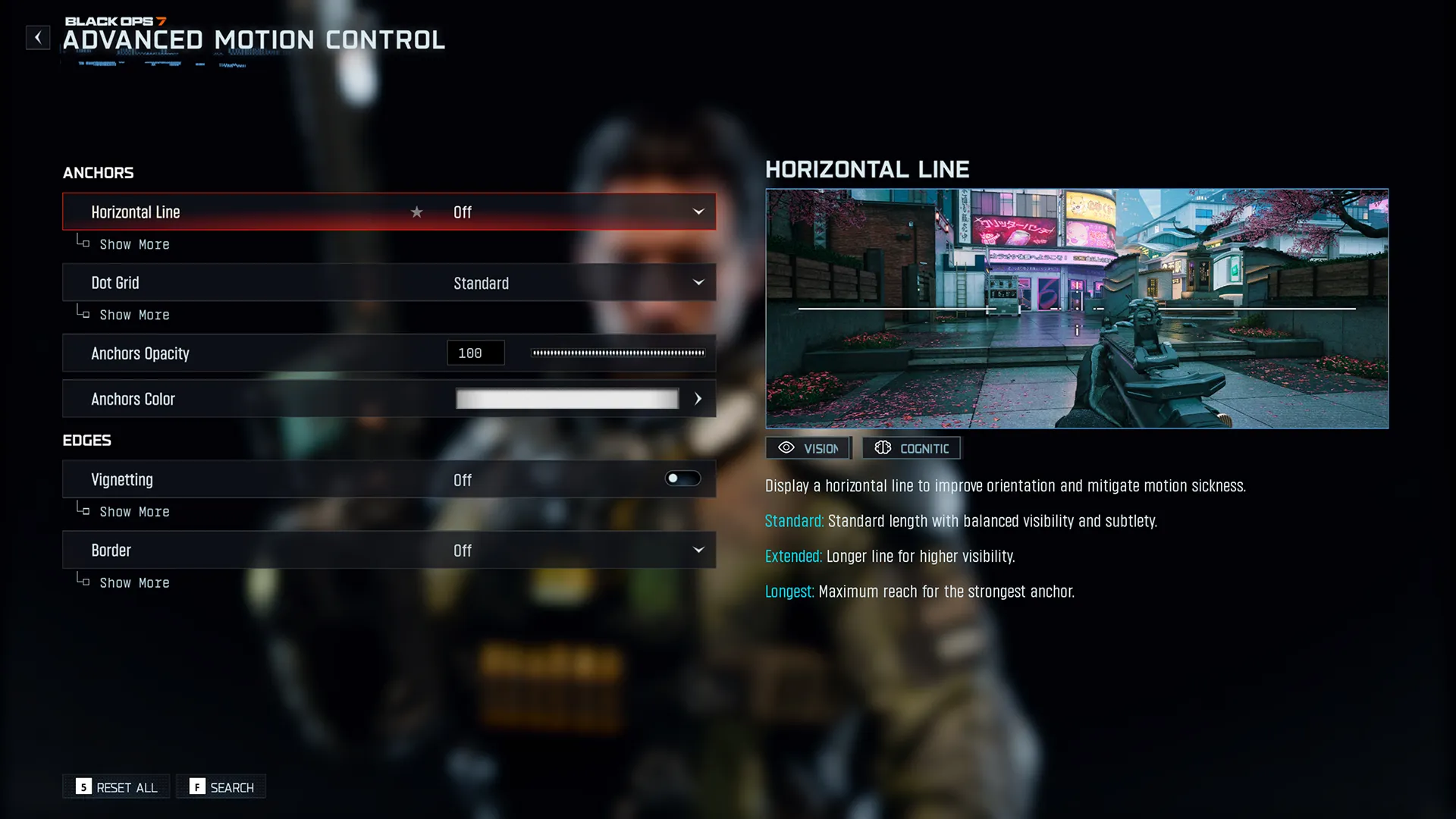
Motion Reduction Options are new to Black Ops 7 and provide players with tools to help reduce motion-related discomfort. Players can now adjust or modify visual and camera effects to create a viewing experience that feels more comfortable and easier to follow during gameplay.
An estimated one-third of the population is susceptible to motion sickness in some way. While motion sickness is often more associated with car, air, or sea travel, it may also be prompted by digital experiences that virtually simulate motion.
Whether reducing motion intensity or simplifying certain visual elements, these evolved motion reduction options help make Black Ops 7 more accessible to players sensitive to movement and screen effects.
Returning Features
Accessibility features introduced in Black Ops 6 return in Black Ops 7, ensuring players continue to have access to the settings they rely on across all modes, including new support for Co-Op Campaign where applicable.
- High Contrast Mode: Enhances visual clarity between gameplay elements. Now also supported in Co-Op Campaign.
- Intelligent Movement Customization: Gives players flexibility to adjust movement controls for comfort and playstyle preference, including new Intelligent Movement settings for Wall Jump.
- Low Motor Strain Preset: Simplifies input actions to help reduce physical effort during gameplay.
- Visual Settings Support: Includes options for Text Size, Color Customization, Inverted Flash, and HUD Customization. HUD presets also return from Black Ops 6 with refreshed settings.
- Arachnophobia Settings: This returning setting allows players to change the appearance of spider-like enemies (for example, Vermin in Dead Ops Arcade 4).
- Crosshair Customization: Allows players to fine-tune reticle style, size, and color for better visibility.
- Reduce Tinnitus Sound: Lowers or filters sharp, high-pitched sounds for a more balanced audio experience.
- Asymmetrical Hearing Compensation: Balances in-game sound for players with hearing differences between ears.
- Enhanced Headphone Mode: Provides clearer and more focused audio when using headphones.
Accessibility will continue to evolve with Call of Duty. By bringing forward established features, enhancing support across new modes, and introducing options like Motion Reduction to combat motion sickness, Black Ops 7 continues to offer more ways for fans to play their way, comfortably and confidently.
Stay tuned for updates and announcements for accessibility features in upcoming feature storis in a future update closer to launch.
©/TM/®2025 Activision Publishing, Inc.
For more information, please visit www.callofduty.com and www.youtube.com/callofduty, and follow @Activision and @CallofDuty on X, Instagram, and Facebook. For Call of Duty Updates, follow @CODUpdates on X.